
Understanding the session types you can run
Updated about 6 hours ago
Browse All
Togetherly gives you four ways to bring people together: a video group, a private telephone group, a public telephone group, and a one-to-one befriending match. They all look similar once a call is running, so the difference is really about who joins, how they join, and how private the session needs to be.
Where you choose a session type
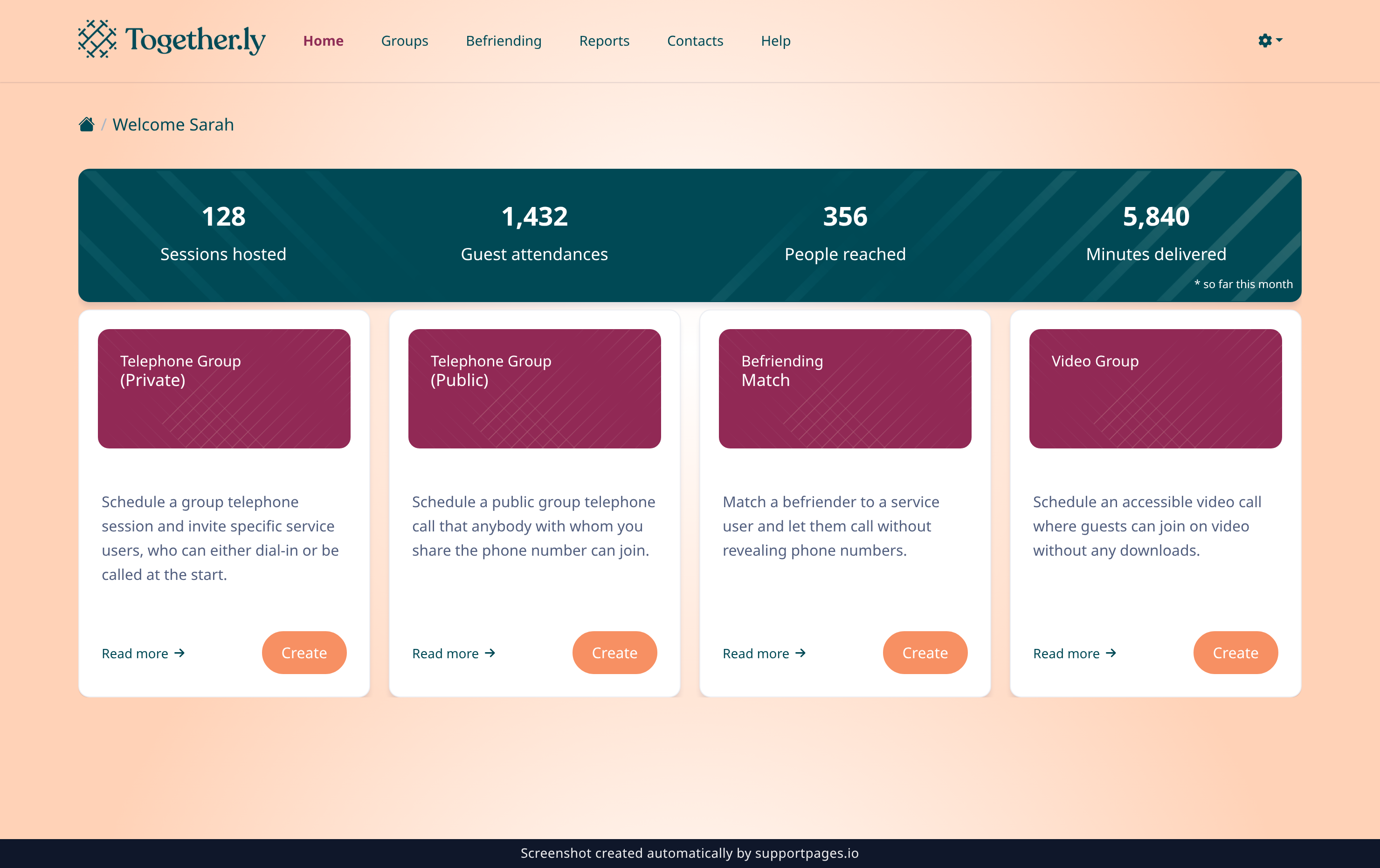
Every session starts from the same screen — Home. It shows a card for each type, with a short description, a Read more link and its own Create button. Everything after that is shared, so this is the only place the choice is made.
Video groups
A video group is a face-to-face group call for up to 12 people — around 9 on camera, with the rest joining by phone. Guests open a link and are in the room with a single tap; there's nothing to download.
Reach for this one when seeing each other matters, when most of the group is comfortable online, and when you want screen sharing or text chat alongside the conversation. Video groups are scheduled in advance, so they suit a regular coffee morning or activity club.
Private telephone groups
A private telephone group is a group call by phone for up to 12 invited people. You choose who's coming, and at the start time Togetherly can ring each guest — they simply answer the phone and they're in.
The numbers are never shared, so nobody needs to ring anyone themselves. Pick the private telephone group when your group is a known set of people who would rather answer a ringing phone than open a link, including anyone without internet access.
Public telephone groups
A public telephone group works over a dedicated phone number that you share. Anyone who dials it joins — no invitation required — and the room can hold up to 200 people.
This is the type for open events like a weekly social hour, guest speaker or drop-in, when you can't predict who will turn up or the group is too big to ring individually. You still get full control of the room and an attendance report afterwards.
Befriending calls
A befriending call is a one-to-one telephone call between a volunteer befriender and a service user. Rather than a fixed meeting time, a befriending match pairs the two people and lets the befriender call when it suits them — both phone numbers stay hidden from each other.
This is the type to use when the relationship, not the event, is the point: a regular friendly chat, a buddying scheme, or a check-in call. Sessions for a match are created for you, and calls can be recorded for safeguarding.
At a glance
- Video Group — up to 12 people, joins by link on video or by phone.
- Telephone Group, private — up to 12 invited people, called at the start time.
- Telephone Group, public — up to 200 people, joins by dialling a shared number.
- Befriending — two people, one-to-one, called on demand with hidden numbers.
Choosing between them
- If you're unsure, ask how your participants would like to join — a link or a ringing phone.
- Private and public groups can both be scheduled as a single session or repeated weekly or monthly.
- A match suited to a group can always be re-created as a different type later; nothing is lost by starting with the closest fit.
Summary
Video groups are for seeing faces, private telephone groups are for a known set of people called at the start, public telephone groups are for anyone who dials in, and befriending matches are for one-to-one calls made on demand. Pick the type that fits how your participants want to join and you can set the details later.
Was this article helpful?
Kept in sync by supportpages.io — continuous documentation for your product.
Have a question?
Search our articles, or ask and get an answer straight away.